simaaiprocesscvu
GStreamer plugin reference: simaaiprocesscvu
Note
The simaaiprocesscvu plugin can not be found under like many
other plugins. Instead, this plugin will be dynamically created when importing a ModelSDK pre-compiled model into
Edgematic. It will be preceded and followed by simaaiprocesscvu plugins that will preprocess and postprocess the
data.
The simaaiprocesscvu GStreamer plugin processes buffers by executing a SiMa.ai graph on the CVU (e.g., EV74).
It acts as an aggregator, collecting input buffers from multiple sources and producing a single output buffer.
The plugin utilizes SiMa.ai’s memory management and dispatcher for efficient execution on the hardware.
The CVU on SiMa.ai’s MLSoC and MLSoC Modalix is a Synopsys ARC-based video processor with multiple cores
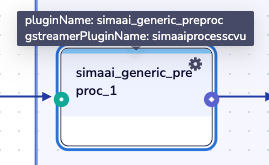
The plugins in the canvas are instantiations of the simaaiprocesscvu GStreamer plugin. Meaning, it
is the simaaiprocesscvu pre-configured for one of the SiMa.ai CVU graphs. In order to know if the plugin
truly is an instance of simaaiprocesscvu, simply hover your mouse over the plugin name, and you should see the name
of the plugin (pluginName) which should match what you see in the canvas, and the gstPluginName which should
match that of simaaiprocesscvu.
Plugin Configurations
All plugins in Edgematic have options and configurations that can be accessed via:
The configuration icon on the top right of each plugin (
 ).
).The source code found in .
Plugin configuration options
The plugin configurator provides 3 tabs:
GENERAL: Generic configuration options shared among plugins. Usually contains mostly which processor or memory space this plugin is operates on. In this case, it should state
APU.CONFIGURATION: This is where the configurations for
input_nodesblock andoutput_nodesblock could be set/reviewed.ADVANCED: This is where you could set the config template to use, as well as all of the parameters for the target CVU graph that the plugin will be executing. A reminder that the parameters in this tab will vary depending on the graph being executed.
Plugin source configurations (advanced)
If you wish to directly alter the code or configurations for the plugin, simply click on the plugin on the canvas and the source will be highlighted in orange on the left panel.
Note
The file structure, source code and other information would be found in the simaaiprocesscvu documentation for the GStreamer plugin.